Adiciona o maegin top embaixo do account, igual a opção do password.. To pelo cell:/
16
5.6k
info
Grupo: Herói
Registrado: 25/10/11
Posts: 2.2k
Reputação: +862
Gênero: Masculino
Char no Tibia: Sociopata
29 de outubro de 2015 às 14:08

info
Grupo: Conde
Registrado: 12/04/15
Posts: 655
Reputação: +65
Gênero: Masculino
Char no Tibia: Developer Berg
29 de outubro de 2015 às 14:25
Adiciona o maegin top embaixo do account, igual a opção do password.. To pelo cell:/
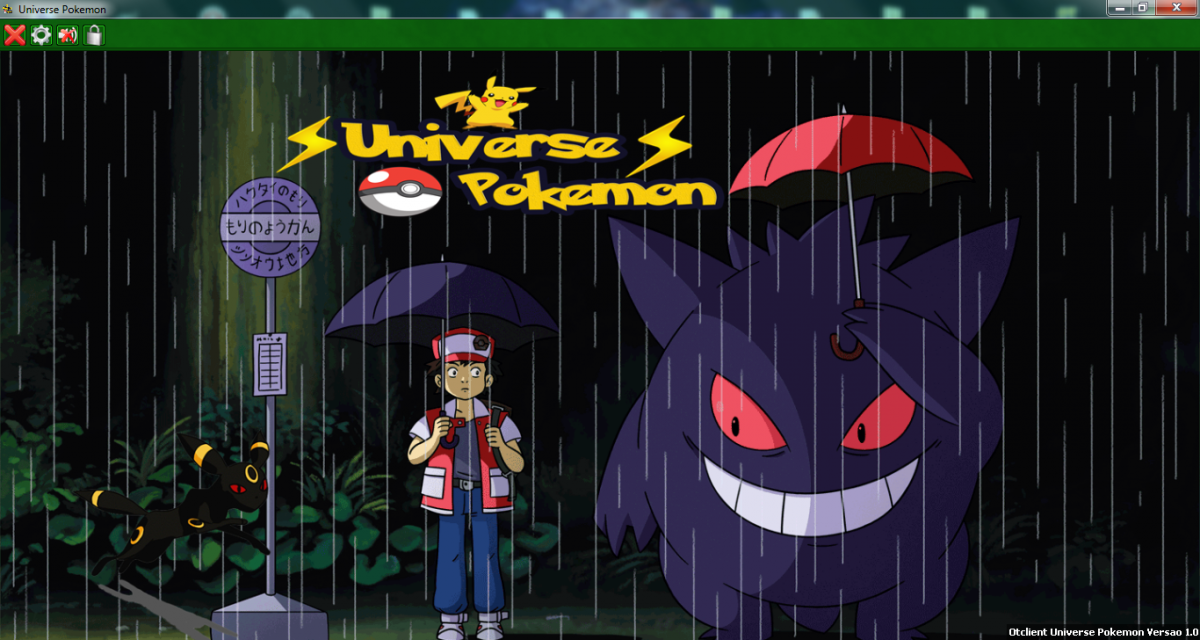
Adicionei, mais o entergame todo sumiu rs, olha como ficou a script, e olha o print
EnterGameWindow < MainWindow
size: 330 312
image-source: enter.png
EnterGameButton < Button
width: 64
ServerListButton < UIButton
size: 17 17
image-source: /images/topbuttons/minimap
image-color: #ffffffff
$hover !disabled:
image-color: #ffffff99
$pressed:
image-color: #ffffff44
$disabled:
image-color: #ffffff55
EnterGameWindow
id: enterGame
@onEnter: EnterGame.doLogin()
MenuLabel
!text: tr('Account name')
anchors.left: parent.left
anchors.top: parent.top
margin-top: 8
text-auto-resize: true
PasswordTextEdit
id: accountNameTextEdit
anchors.left: parent.left
anchors.right: parent.right
anchors.top: prev.bottom
margin-top: 70
MenuLabel
!text: tr('Password')
anchors.left: prev.left
anchors.top: prev.bottom
margin-top: 8
text-auto-resize: true
PasswordTextEdit
id: accountPasswordTextEdit
anchors.left: parent.left
anchors.right: parent.right
anchors.top: prev.bottom
margin-top: 2
MenuLabel
id: serverLabel
!text: tr('Server')
anchors.left: prev.left
anchors.top: prev.bottom
margin-top: 8
text-auto-resize: true
ServerListButton
id: serverListButton
!tooltip: tr('Server list')
anchors.right: parent.right
anchors.top: serverLabel.bottom
margin-top: 3
@onClick: ServerList.show()
TextEdit
id: serverHostTextEdit
!tooltip: tr('Make sure that your client uses\nthe correct game client version')
anchors.left: parent.left
anchors.right: serverListButton.left
anchors.top: serverLabel.bottom
margin-top: 2
margin-right: 4
MenuLabel
id: clientLabel
!text: tr('Client Version')
anchors.left: parent.left
anchors.top: serverHostTextEdit.bottom
text-auto-resize: true
margin-right: 10
margin-top: 8
ComboBox
id: clientComboBox
anchors.left: parent.left
anchors.right: parent.horizontalCenter
anchors.top: clientLabel.bottom
margin-top: 2
margin-right: 3
width: 90
MenuLabel
id: portLabel
!text: tr('Port')
anchors.left: serverPortTextEdit.left
anchors.top: serverHostTextEdit.bottom
margin-top: 8
text-auto-resize: true
TextEdit
id: serverPortTextEdit
text: 7171
anchors.right: parent.right
anchors.left: parent.horizontalCenter
anchors.top: clientComboBox.top
margin-left: 3
CheckBox
id: rememberPasswordBox
!text: tr('Remember password')
!tooltip: tr('Remember account and password when starts client')
anchors.left: parent.left
anchors.right: parent.right
anchors.top: prev.bottom
margin-top: 10
@onCheckChange: self:getParent():getChildById('autoLoginBox'):setEnabled(self:isChecked())
CheckBox
id: autoLoginBox
enabled: false
!text: tr('Auto login')
!tooltip: tr('Open charlist automatically when starting client')
anchors.left: parent.left
anchors.right: parent.right
anchors.top: prev.bottom
margin-top: 2
EnterGameButton
!text: tr('Ok')
anchors.right: parent.right
anchors.bottom: parent.bottom
@onClick: EnterGame.doLogin()
Label
id: serverInfoLabel
font: verdana-11px-rounded
anchors.bottom: parent.bottom
anchors.left: parent.left
color: green
text-auto-resize: true
ah sim, só pra constar rs, ai na script ta dizendo que tem um " Espaço " a mais no magin que eu adicionei, mais n tem, é o spoiler que ta bugando, na script aqui no Notpad++ ta normal.
olha print do entergame como ficou
info
Grupo: Herói
Registrado: 25/10/11
Posts: 2.2k
Reputação: +862
Gênero: Masculino
Char no Tibia: Sociopata
29 de outubro de 2015 às 14:29
Faz assim, cópia do lassword com espaço. Daí você vai no account, da um enter. Apaga até o fim da linha. E cola hah
info
Grupo: Conde
Registrado: 12/04/15
Posts: 655
Reputação: +65
Gênero: Masculino
Char no Tibia: Developer Berg
29 de outubro de 2015 às 14:40
Faz assim, cópia do lassword com espaço. Daí você vai no account, da um enter. Apaga até o fim da linha. E cola hah
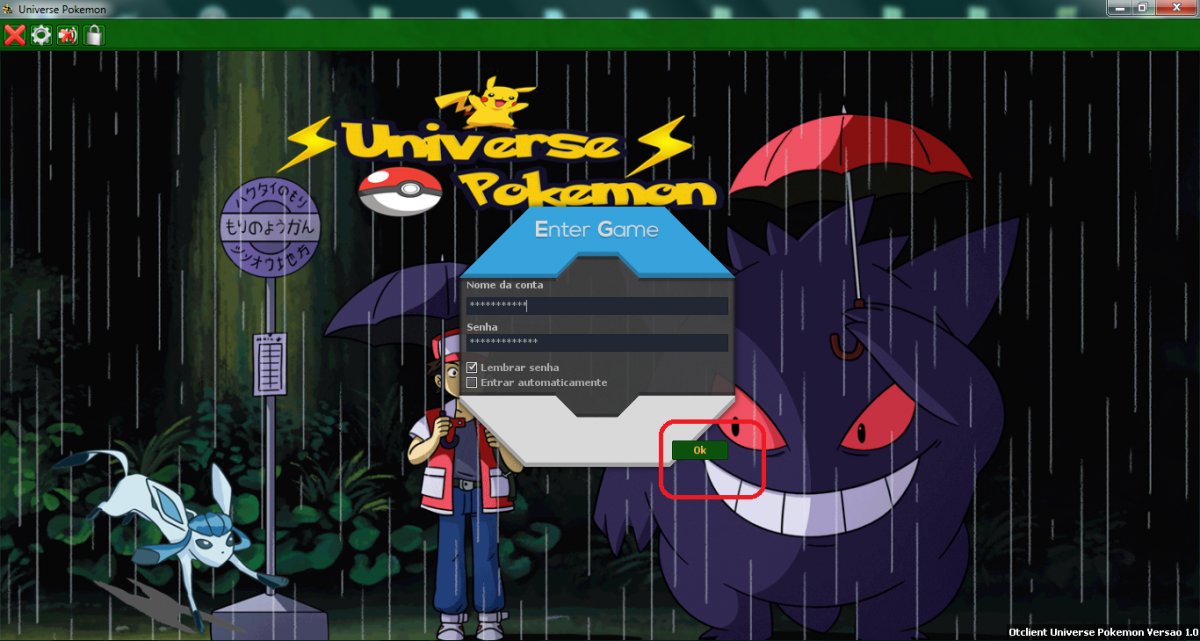
aee pegou, e como faço agr pra o " Ok " ? rs
info
Grupo: Herói
Registrado: 25/10/11
Posts: 2.2k
Reputação: +862
Gênero: Masculino
Char no Tibia: Sociopata
29 de outubro de 2015 às 14:58
Faz a mesma coisa, só que você apaga contexto e edita pra isso olha:
Desce lá no fim, e vai ter às propriedades do OK:
Adiciona isto:
margin-bottom: 8
margin-right: 10
Segue o mesmo procedimento acima.
info
Grupo: Conde
Registrado: 12/04/15
Posts: 655
Reputação: +65
Gênero: Masculino
Char no Tibia: Developer Berg
29 de outubro de 2015 às 15:03
Faz a mesma coisa, só que você apaga contexto e edita pra isso olha:
Desce lá no fim, e vai ter às propriedades do OK:
Adiciona isto:
margin-bottom: 8
margin-right: 10
Segue o mesmo procedimento acima.
Aee, conseguir ^^ obg rs, reputado ^^, vc poderia me dizer qual o comando que faz o bottom do OK crescer ? ele está muito pequeno, queria mudar a altura e a largura dele
info
Grupo: Herói
Registrado: 25/10/11
Posts: 2.2k
Reputação: +862
Gênero: Masculino
Char no Tibia: Sociopata
29 de outubro de 2015 às 15:05
Acho melhor você usar uma imagem. Faça a imagem do tamanho que quiser. Se quiser tentar, posso te ajudar haha
info
Grupo: Conde
Registrado: 12/04/15
Posts: 655
Reputação: +65
Gênero: Masculino
Char no Tibia: Developer Berg
29 de outubro de 2015 às 15:12
Acho melhor você usar uma imagem. Faça a imagem do tamanho que quiser. Se quiser tentar, posso te ajudar haha
sim, seria bem melhor usar uma imagem, me ajuda, kk n faço nem ideia de como começar kk
info
Grupo: Herói
Registrado: 25/10/11
Posts: 2.2k
Reputação: +862
Gênero: Masculino
Char no Tibia: Sociopata
29 de outubro de 2015 às 15:17
Bem.. Cria a imagem, vou criar as propriedades aqui e mandar tu adicionar.
info
Grupo: Conde
Registrado: 12/04/15
Posts: 655
Reputação: +65
Gênero: Masculino
Char no Tibia: Developer Berg
29 de outubro de 2015 às 15:19
ok ^^
info
Grupo: Herói
Registrado: 25/10/11
Posts: 2.2k
Reputação: +862
Gênero: Masculino
Char no Tibia: Sociopata
29 de outubro de 2015 às 15:29
vai no seu entergame.otui, procura nas primeiras linhas isso:
EnterGameButton < Button
e subistitui por isso:
EnterGameButton < Button
image-source: botao.png
image-clip: 0 0 20 20
image-border: 2
image-color: #ffffffff
$hover:
image-clip: 0 20 20 20
$pressed:
image-clip: 0 40 20 20
$disabled:
image-color: #ffffff66
info
Grupo: Conde
Registrado: 12/04/15
Posts: 655
Reputação: +65
Gênero: Masculino
Char no Tibia: Developer Berg
29 de outubro de 2015 às 15:39
vai no seu entergame.otui, procura nas primeiras linhas isso:
EnterGameButton < Buttone subistitui por isso:EnterGameButton < Button image-source: botao.png image-clip: 0 0 20 20 image-border: 2 image-color: #ffffffff $hover: image-clip: 0 20 20 20 $pressed: image-clip: 0 40 20 20 $disabled: image-color: #ffffff66
a imagem tem que ser de que tamanho ?
deixa, consegui kk, obg man ^^, eii poderia criar um tutorial ensinando a mudar aquele Character ? a parte que a pessoa escolhe o Character, tipo, colocar a imagem que a pessoa quer, personalizando e tals
info
Grupo: Herói
Registrado: 25/10/11
Posts: 2.2k
Reputação: +862
Gênero: Masculino
Char no Tibia: Sociopata
29 de outubro de 2015 às 15:40
Bem, ainda não parei para mexer nisso. Mas em breve postarei, pode ficar sussa haha, caso tenha mais alguma duvida, é só criar um topico ai que a gente te ajuda ^^
info
Grupo: Conde
Registrado: 12/04/15
Posts: 655
Reputação: +65
Gênero: Masculino
Char no Tibia: Developer Berg
29 de outubro de 2015 às 15:50
Bem, ainda não parei para mexer nisso. Mas em breve postarei, pode ficar sussa haha, caso tenha mais alguma duvida, é só criar um topico ai que a gente te ajuda ^^
obg pela ajuda ^^
info
Grupo: Conde
Registrado: 12/04/15
Posts: 655
Reputação: +65
Gênero: Masculino
Char no Tibia: Developer Berg
Olá Gente, queria pedir a vcs para me ajudar a mover 2 nomes no meu entergame do otc, é o nome " Nome Da Conta " e o " OK " Para entrar no jogo.
vou deixar a script de onde modifica, mais n to achando o local de modificar, e vou deixar print para vcs verem do que estou falando.
Script
EnterGameWindow < MainWindow
  size: 330 312
  image-source: enter.png

EnterGameButton < Button
  width: 64

ServerListButton < UIButton
  size: 17 17
  image-source: /images/topbuttons/minimap
  image-color: #ffffffff

  $hover !disabled:
    image-color: #ffffff99

  $pressed:
    image-color: #ffffff44

  $disabled:
    image-color: #ffffff55

EnterGameWindow
  id: enterGame
  @onEnter: EnterGame.doLogin()

  MenuLabel
    !text: tr('Account name')
    anchors.left: parent.left
    anchors.top: parent.top
    text-auto-resize: true

  PasswordTextEdit
    id: accountNameTextEdit
    anchors.left: parent.left
    anchors.right: parent.right
    anchors.top: prev.bottom
    margin-top: 70

  MenuLabel
    !text: tr('Password')
    anchors.left: prev.left
    anchors.top: prev.bottom
    margin-top: 8
    text-auto-resize: true

  PasswordTextEdit
    id: accountPasswordTextEdit
    anchors.left: parent.left
    anchors.right: parent.right
    anchors.top: prev.bottom
    margin-top: 2

  MenuLabel
    id: serverLabel
    !text: tr('Server')
    anchors.left: prev.left
    anchors.top: prev.bottom
    margin-top: 8
    text-auto-resize: true

  ServerListButton
    id: serverListButton
    !tooltip: tr('Server list')
    anchors.right: parent.right
    anchors.top: serverLabel.bottom
    margin-top: 3
    @onClick: ServerList.show()

  TextEdit
    id: serverHostTextEdit
    !tooltip: tr('Make sure that your client uses\nthe correct game client version')
    anchors.left: parent.left
    anchors.right: serverListButton.left
    anchors.top: serverLabel.bottom
    margin-top: 2
    margin-right: 4

  MenuLabel
    id: clientLabel
    !text: tr('Client Version')
    anchors.left: parent.left
    anchors.top: serverHostTextEdit.bottom
    text-auto-resize: true
    margin-right: 10
    margin-top: 8

  ComboBox
    id: clientComboBox
    anchors.left: parent.left
    anchors.right: parent.horizontalCenter
    anchors.top: clientLabel.bottom
    margin-top: 2
    margin-right: 3
    width: 90

  MenuLabel
    id: portLabel
    !text: tr('Port')
    anchors.left: serverPortTextEdit.left
    anchors.top: serverHostTextEdit.bottom
    margin-top: 8
    text-auto-resize: true

  TextEdit
    id: serverPortTextEdit
    text: 7171
    anchors.right: parent.right
    anchors.left: parent.horizontalCenter
    anchors.top: clientComboBox.top
    margin-left: 3

  CheckBox
    id: rememberPasswordBox
    !text: tr('Remember password')
    !tooltip: tr('Remember account and password when starts client')
    anchors.left: parent.left
    anchors.right: parent.right
    anchors.top: prev.bottom
    margin-top: 10
    @onCheckChange: self:getParent():getChildById('autoLoginBox'):setEnabled(self:isChecked())

  CheckBox
    id: autoLoginBox
    enabled: false
    !text: tr('Auto login')
    !tooltip: tr('Open charlist automatically when starting client')
    anchors.left: parent.left
    anchors.right: parent.right
    anchors.top: prev.bottom
    margin-top: 2

  EnterGameButton
    !text: tr('Ok')
    anchors.right: parent.right
    anchors.bottom: parent.bottom
    @onClick: EnterGame.doLogin()

  Label
    id: serverInfoLabel
    font: verdana-11px-rounded
    anchors.bottom: parent.bottom
    anchors.left: parent.left
    color: green
    text-auto-resize: true