
Como faço para modificar essa função?
maxSlot = 5
Queria 5 para premium e 3 para free, tem essa função:
-- altere ao seu gosto podendo fazer: g_game.getLocalPlayer():isPremium() and valorX or valorY
quando altero ocorre varios erros...
Como faço para modificar essa função?
maxSlot = 5
Queria 5 para premium e 3 para free, tem essa função:
-- altere ao seu gosto podendo fazer: g_game.getLocalPlayer():isPremium() and valorX or valorY
quando altero ocorre varios erros...
info
Grupo: Campones
Registrado: 09/06/17
Posts: 23
Reputação: +1
Gênero: Masculino

Em 15/12/2018 em 10:57, Gengo disse:Fala ai galera do xtibia estou aqui trazendo mais um module para o otClient.
Esses dias atras estavo jogando pokestorm e me deparei com o autoloot e decidi fazer um parecido com o deles e então pensei porque não trazer para a comunidade? Afinal não vejo muitos modulos de autoloot para otClient o unico que vi foi o autoloot da DxP, porem não é muito intuitivo comparado com modulo da pokestorm, bom sem mais enrolação vamos lá.
Feito o download do arquivo, coloque-o na pasta do seu otClient em /modules/ e pronto já é possível "utilizar-lo", porem com algumas exceções de algumas configurações básicas que temos que fazer para poder utilizar-lo com algumas eficiências.
1º Na pasta do seu otClient/data/ crie uma pasta chamada items e coloque o seus arquivos items.otb e items.xml.
2º Vai até a pasta do seu otClient/modules/game_things abre o arquivo things.lua e procure a função load(), e coloque o seguinte:
g_things.loadOtb ('/items/items.otb')
g_things.loadXml('/items/items.xml')
Obs: Não se assustem quando entrarem no client para logar, no inicio vai dar uma travada, mas depois de esperar uns segundos ele normaliza, pois o único problema é que o carregamento dos arquivos dos items eles são demorados.
Também é preciso fazer umas configurações rápida na parte do servidor para poder funcionar.
Copie e cole esse script e coloque na pasta do servidor em mods/ e de o nome de autoloot.xml<?xml version="1.0" encoding="ISO-8859-1"?> <mod name="Loot System" version="1.0" author="Vodkart And Mkalo" contact="none.com" enabled="yes"> <config name="Loot_func"><![CDATA[ info = { AutomaticDeposit = true, BlockMonsters = {}, BlockItemsList = {2123,2515}, Max_Slots = {free = 3, premium = 5}, Storages = {27000,28001,28002} } function setPlayerStorageTable(cid, storage, tab) local tabstr = "&" for i,x in pairs(tab) do tabstr = tabstr .. i .. "," .. x .. ";" end setPlayerStorageValue(cid, storage, tabstr:sub(1, #tabstr-1)) end function getPlayerStorageTable(cid, storage) local tabstr = getPlayerStorageValue(cid, storage) local tab = {} if type(tabstr) ~= "string" then return {} end if tabstr:sub(1,1) ~= "&" then return {} end local tabstr = tabstr:sub(2, #tabstr) local a = string.explode(tabstr, ";") for i,x in pairs(a) do local b = string.explode(x, ",") tab[tonumber(b[1]) or b[1]] = tonumber(b[2]) or b[2] end return tab end function isInTable(cid, item) for _,i in pairs(getPlayerStorageTable(cid, info.Storages[1]))do if tonumber(i) == tonumber(item) then return true end end return false end function addItemTable(cid, item) local x = {} for i = 1,#getPlayerStorageTable(cid, info.Storages[1]) do table.insert(x,getPlayerStorageTable(cid, info.Storages[1])[i]) end if x ~= 0 then table.insert(x,tonumber(item)) setPlayerStorageTable(cid, info.Storages[1], x) else setPlayerStorageTable(cid, info.Storages[1], {item}) end end function removeItemTable(cid, item) local x = {} for i = 1,#getPlayerStorageTable(cid, info.Storages[1]) do table.insert(x,getPlayerStorageTable(cid, info.Storages[1])[i]) end for i,v in ipairs(x) do if tonumber(v) == tonumber(item) then table.remove(x,i) end end return setPlayerStorageTable(cid, info.Storages[1], x) end function ShowItemsTabble(cid) local n,str = 0,"[+] Auto Loot Commands [+]\n\n!autoloot item name --> To add ou Remove item from list.\n!autoloot money --> To collect gold automatically.\n!autoloot clear --> To clear the list.\n!autoloot on/off --> To enable or disable the collecting of items in the system.\n\n[+] Auto Loot Info [+]\n\nSystem: "..(getPlayerStorageValue(cid, info.Storages[3]) <= 0 and "Activated" or "Disabled")..".\nGold Collecting: "..(getPlayerStorageValue(cid, info.Storages[2]) > 0 and "Activated" or "Disabled")..".\nBalance Total: ["..getPlayerBalance(cid).."] gp's.\nMaximum Slots: ["..#getPlayerStorageTable(cid, info.Storages[1]).."/"..(isPremium(cid) and info.Max_Slots.premium or info.Max_Slots.free).."]\n\n[+] Auto Loot Slots [+]\n\n" for i = 1,#getPlayerStorageTable(cid, info.Storages[1]) do n = n + 1 str = str.."Slot "..n.." - "..getItemNameById(getPlayerStorageTable(cid, info.Storages[1])[i]).."\n" end return doPlayerPopupFYI(cid, str) end function getContainerItems(containeruid) local items = {} local containers = {} if type(getContainerSize(containeruid)) ~= "number" then return false end for slot = 0, getContainerSize(containeruid)-1 do local item = getContainerItem(containeruid, slot) if item.itemid == 0 then break end if isContainer(item.uid) then table.insert(containers, item.uid) end table.insert(items, item) end if #containers > 0 then for i,x in ipairs(getContainerItems(containers[1])) do table.insert(items, x) end table.remove(containers, 1) end return items end function getItemsInContainerById(container, itemid) -- Function By Kydrai local items = {} if isContainer(container) and getContainerSize(container) > 0 then for slot=0, (getContainerSize(container)-1) do local item = getContainerItem(container, slot) if isContainer(item.uid) then local itemsbag = getItemsInContainerById(item.uid, itemid) for i=0, #itemsbag do table.insert(items, itemsbag[i]) end else if itemid == item.itemid then table.insert(items, item.uid) end end end end return items end function doPlayerAddItemStacking(cid, itemid, amount) -- revisado local item, _G = getItemsInContainerById(getPlayerSlotItem(cid, 3).uid, itemid), 0 if #item > 0 then for _ ,x in pairs(item) do local ret = getThing(x) if ret.type < 100 then doTransformItem(ret.uid, itemid, ret.type+amount) if ret.type+amount > 100 then doPlayerAddItem(cid, itemid, ret.type+amount-100) end break else _G = _G+1 end end if _G == #item then doPlayerAddItem(cid, itemid, amount) end else return doPlayerAddItem(cid, itemid, amount) end end function AutomaticDeposit(cid,item,n) local deposit = item == tonumber(2160) and (n*10000) or tonumber(item) == 2152 and (n*100) or (n*1) return doPlayerDepositMoney(cid, deposit) end function corpseRetireItems(cid, pos) local check = false for i = 0, 255 do pos.stackpos = i tile = getTileThingByPos(pos) if tile.uid > 0 and isCorpse(tile.uid) then check = true break end end if check == true then local items = getContainerItems(tile.uid) for i,x in pairs(items) do if isInArray(getPlayerStorageTable(cid, info.Storages[1]), tonumber(x.itemid)) or getPlayerStorageValue(cid, info.Storages[2]) > 0 and isInArray({2148,2152,2160},tonumber(x.itemid)) then if isItemStackable(x.itemid) then doPlayerAddItemStacking(cid, x.itemid, x.type) if info.AutomaticDeposit == true and isInArray({2148,2152,2160}, tonumber(x.itemid)) then AutomaticDeposit(cid,x.itemid,x.type) end else doPlayerAddItem(cid, x.itemid) end doRemoveItem(x.uid) end end end end ]]></config> <event type="login" name="LootLogin" event="script"><![CDATA[ function onLogin(cid) registerCreatureEvent(cid, "LootEventKIll") if isPremium(cid) and getPlayerStorageValue(cid, 27001) <= 0 then setPlayerStorageValue(cid, 27001, 1) elseif getPlayerStorageValue(cid, 27001) > 0 and not isPremium(cid) then doPlayerSendTextMessage(cid, MESSAGE_STATUS_CONSOLE_BLUE, "[Auto Loot] You premium is Over, Start a new list!") setPlayerStorageValue(cid, 27001, -1) setPlayerStorageValue(cid, info.Storages[1], -1) end return true end]]></event> <event type="kill" name="LootEventKIll" event="script"><![CDATA[ domodlib('Loot_func') function onKill(cid, target, lastHit) if isPlayer(cid) and getPlayerStorageValue(cid, info.Storages[3]) <= 0 and isMonster(target) and not isInArray(info.BlockMonsters, getCreatureName(target):lower()) then addEvent(corpseRetireItems, 0, cid ,getThingPos(target)) end return true end]]></event> <talkaction words="!autoloot;/autoloot" event="buffer"><![CDATA[ domodlib('Loot_func') local slots = isPremium(cid) and info.Max_Slots.premium or info.Max_Slots.free if not param:lower() or param:lower() == "" then return true elseif param:lower() == "clean" then setPlayerStorageValue(cid, info.Storages[1], -1) doPlayerSendTextMessage(cid, MESSAGE_STATUS_CONSOLE_ORANGE,"[Auto Loot] Your list has been cleaned.") return true elseif isInArray({"on","off"}, param:lower()) then setPlayerStorageValue(cid, info.Storages[3], getPlayerStorageValue(cid, info.Storages[3]) <= 0 and 1 or 0) doPlayerSendTextMessage(cid, MESSAGE_STATUS_CONSOLE_ORANGE,"[Auto Loot] "..(getPlayerStorageValue(cid, info.Storages[3]) > 0 and "Stopped" or "Started")..".") return true end local param = string.explode(param, ",") if param[1]:lower() == "add" then local item = getItemIdByName(param[2], false) if not item then doPlayerSendCancel(cid, "This item does not exist.") return true end local var = isInTable(cid, item) if isInArray(info.BlockItemsList, item) then doPlayerSendCancel(cid, "You can not add this item in the list!") return true elseif not var and #getPlayerStorageTable(cid, info.Storages[1]) >= slots then doPlayerSendCancel(cid, "max "..slots.." from auto loot") return true end if not var then addItemTable(cid, item) end doPlayerSendTextMessage(cid, MESSAGE_STATUS_CONSOLE_BLUE, "[AutoLoot] You added the item ["..param[2].."] in the list") elseif param[1]:lower() == "remove" then local item = getItemIdByName(param[2], false) if not item then doPlayerSendCancel(cid, "This item does not exist.") return true end removeItemTable(cid, item) doPlayerSendTextMessage(cid, MESSAGE_STATUS_CONSOLE_BLUE, "[AutoLoot] You removed the item ["..param[2].."] from the list") end return true]]></talkaction> </mod>
Ainda na pasta do seu servidor abre o arquivo /data/creaturescripts/scripts/login.lua e coloque o seguinte script dentro da função onLogin:local loot = '' for i = 1, #getPlayerStorageTable(cid, info.Storages[1]) do loot = loot..getItemInfo(getPlayerStorageTable(cid, info.Storages[1])[i]).clientId..'-'..getItemNameById(getPlayerStorageTable(cid, info.Storages[1])[i])..'@' end doSendPlayerExtendedOpcode(cid, 157, loot)
Feito todos os passos corretamente, configurado certo, deve ficar assim no game:
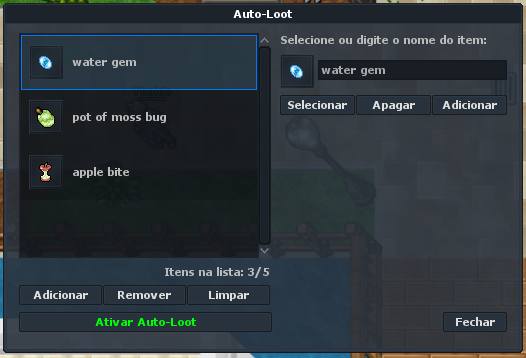
Bom espero que tenham entendido e gostado, não sou muito de ficar escrevendo tutorial, até uma próxima.
Download
Créditos
Gengo(eu) - módule para o otClient.
Vodkart e Mkalo - autoloot na parte do servidor.
o meu foi mais não está coletando os itens sabe fala o pq ?
It is possible to make that work without folder mods? im using tfs 1.4 8.0
info
Grupo: Visconde
Registrado: 18/03/19
Posts: 390
Reputação: +22
Gênero: Masculino
Char no Tibia: Rafersiq

desculpa eu reviver esse topico mas to com um erro no system que fica assim quando coloca no alto loot
.png.218290f2298ae4010342ac1589fd62b6.png)
se alguem solber me ajudar a resolver isso eu agradeço
info
Grupo: Conde
Registrado: 15/12/17
Posts: 989
Reputação: +166
Gênero: Masculino

Em 12/07/2022 em 14:11, rafersiq disse:desculpa eu reviver esse topico mas to com um erro no system que fica assim quando coloca no alto loot
se alguem solber me ajudar a resolver isso eu agradeço
O script de auto loot do gengo utiliza a funçaõ: getItemInfo para obter uma informação do item, portanto se isso acontece, significa que talvez o item possa não estar registrado no items.xml.
info
Grupo: Visconde
Registrado: 18/03/19
Posts: 390
Reputação: +22
Gênero: Masculino
Char no Tibia: Rafersiq
31 minutos atrás, Thalles Vitor disse:
O script de auto loot do gengo utiliza a funçaõ: getItemInfo para obter uma informação do item, portanto se isso acontece, significa que talvez o item possa não estar registrado no items.xml.
ja dessisti desse auto loot , vou comprar de voce o system mais pra frente
como colocar o opcode no tfs 1.+ ?
info
Grupo: Campones
Registrado: 30/05/22
Posts: 2
Reputação: 0

Adicionei tudo certinho na BASE DXP porem na distro aparece isso e nao entra no char pq sera ? Esse info eu teria q muda pra algo q meu server aceita?
[06/02/2023 19:25:03] [Error - CreatureScript Interface]
[06/02/2023 19:25:03] data/creaturescripts/scripts/player/login.lua:onLogin
[06/02/2023 19:25:03] Description:
[06/02/2023 19:25:03] data/creaturescripts/scripts/player/login.lua:51: attempt to index global 'info' (a nil value)
[06/02/2023 19:25:03] stack traceback:
[06/02/2023 19:25:03] data/creaturescripts/scripts/player/login.lua:51: in function <data/creaturescripts/scripts/player/login.lua:48>
info
Grupo: Visconde
Registrado: 18/03/19
Posts: 390
Reputação: +22
Gênero: Masculino
Char no Tibia: Rafersiq
Em 06/02/2023 em 19:30, maiconmoreira disse:Adicionei tudo certinho na BASE DXP porem na distro aparece isso e nao entra no char pq sera ? Esse info eu teria q muda pra algo q meu server aceita?
[06/02/2023 19:25:03] [Error - CreatureScript Interface]
[06/02/2023 19:25:03] data/creaturescripts/scripts/player/login.lua:onLogin
[06/02/2023 19:25:03] Description:
[06/02/2023 19:25:03] data/creaturescripts/scripts/player/login.lua:51: attempt to index global 'info' (a nil value)
[06/02/2023 19:25:03] stack traceback:
[06/02/2023 19:25:03] data/creaturescripts/scripts/player/login.lua:51: in function <data/creaturescripts/scripts/player/login.lua:48>
tem alguma parte do system que ta interferindo no login.lua:onLogin
info
Grupo: Campones
Registrado: 10/02/23
Posts: 1
Reputação: 0
Know about Top MBA colleges in Lucknow from our website
Want to know about the Top MBA colleges in Lucknow? Which college is best for the students for their careers? Are you confused about the selection of management colleges? If you’re confused about these colleges then you must navigate to our website. Do you need any information about the college in a detailed manner? For this, we have a team of experts that mention all the information on the website. You’ll get all kinds of details about fees, the course duration of the college and many other things from this website.
info
Grupo: Campones
Registrado: 25/08/17
Posts: 15
Reputação: 0
Gênero: Masculino
erro creaturescripts login.lua
[Error - LuaScriptInterface::loadFile] datapack/creaturescripts/scripts/login.lua:353: '<eof>' expected near 'end'
[11/09/2023 03:38:17] [Warning - Event::loadScript] Cannot load script (datapack/creaturescripts/scripts/login.lua)
[0datapack/creaturescripts/scripts/login.lua:353: '<eof>' expected near 'end'
info
Grupo: Visconde
Registrado: 19/06/07
Posts: 267
Reputação: +1
Gênero: Masculino
Char no Tibia: Rambocop Infernus

Muito bom @Gengo, consegui utilizar e adaptar para meu servidor, obrigado por compartilhar 
Resultado:
Consegui ligar perfeitamente o modulo consigo add items, mais tem um porém quando deslogo some icone item que vc add no game oque pode ser ?
Editado Dezembro 15 por Yuri King





info
Grupo: Artesão
Registrado: 22/09/20
Posts: 101
Reputação: +3
Gênero: Masculino
Top!
Editado Novembro 25 por Nysman