

Esta noticia foi arquivada.
Este tópico está fechado e foi movido para Noticia - Arquivo.
+ Caso tenha atualizações você poderá criar outro tópico.
Este tópico está fechado e foi movido para Noticia - Arquivo.
+ Caso tenha atualizações você poderá criar outro tópico.
info
Grupo: Campones
Registrado: 20/06/11
Posts: 38
Reputação: +6
Char no Tibia: Stone On Antica
<b style="-webkit-box-shadow: none !important; ">Então pessoal, nesse tutorial, vou ensinar a vocês a como criar um OTserv do zero! (Incluindo Site)<br style="-webkit-box-shadow: none !important; "><br style="-webkit-box-shadow: none !important; ">Downloads abaixo do tutorial .<br style="-webkit-box-shadow: none !important; "><br style="-webkit-box-shadow: none !important; ">Vamos la.<br style="-webkit-box-shadow: none !important; ">1º Criando Seu Server:<br style="-webkit-box-shadow: none !important; "><br style="-webkit-box-shadow: none !important; ">Primeiro, extraia o conteúdo do seu OTserver em alguma pasta!<br style="-webkit-box-shadow: none !important; ">Você verá que tem um arquivo com esse nome: config.lua<br style="-webkit-box-shadow: none !important; "><br style="-webkit-box-shadow: none !important; ">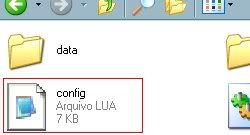 <br style="-webkit-box-shadow: none !important; "><br style="-webkit-box-shadow: none !important; ">Clique com o botão direito nele, vá em abrir com: Bloco de notas.<br style="-webkit-box-shadow: none !important; "><br style="-webkit-box-shadow: none !important; ">
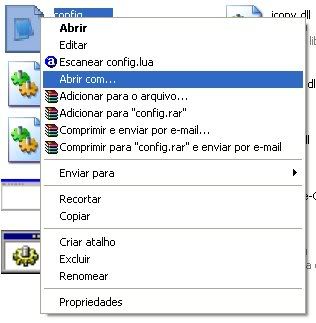 <br style="-webkit-box-shadow: none !important; ">
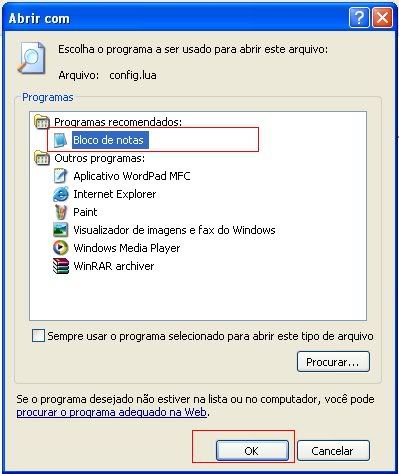 <br style="-webkit-box-shadow: none !important; "><br style="-webkit-box-shadow: none !important; ">Dentro dele, tem muitas coisas....<br style="-webkit-box-shadow: none !important; ">Só vamos configurar as seguintes:</b>
Abração Ae , Sempre Xtibia
Desculpem , as letras não sairam legal ali , mas da para entender